AnimationMap
EN
Open studio
MAP ANIMATION SOFTWARE

Animated Map Maker

Create map animation videos with camera transitions, country highlights, merging, routes, and 3D objects. Edit each scene and export for YouTube, Shorts, or Reels.

Browser editor · MP4 export · Landscape & portrait

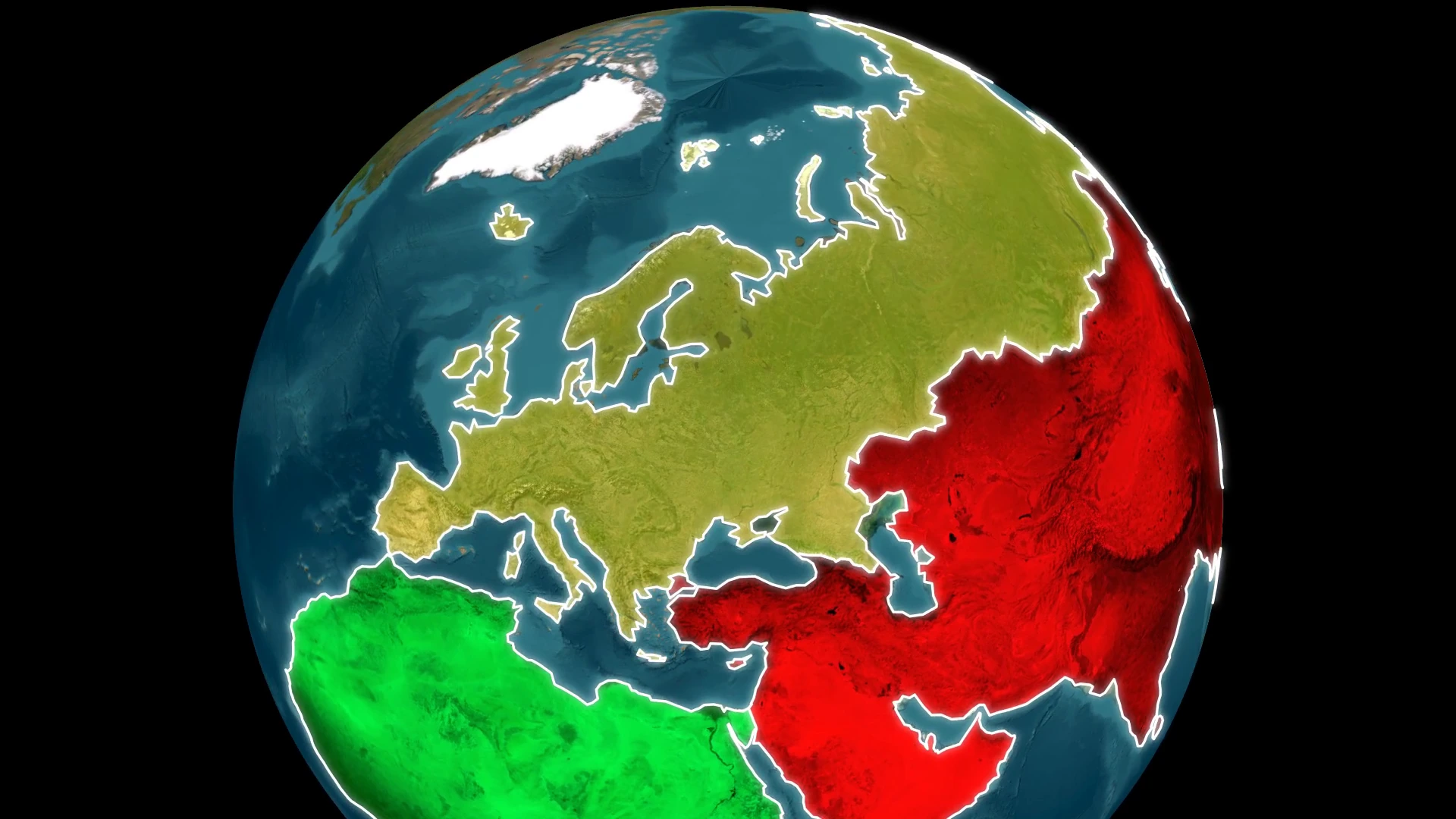
A satellite globe with colored continents and bright white boundaries.
Video 1 of 4: Animated globe

Choose how to create your map animation

SCENE SEQUENCE BUILDER

Create map animations between multiple places

Add locations, drag them into order, and select the camera movement between each one. AnimationMap creates the scenes and camera keyframes for you.

  • Search for places or pick them on the map
  • Select a fill for each place
  • Edit every generated scene and transition
Scene sequence details →
Multiple countries selected with blue outlines on the map, with controls to add seven places to one scene or create seven scenes.
Select multiple places, then add them to one scene or create a sequence.View full size
COUNTRY MERGE ANIMATION

Animate country and region takeovers

Select the main place and the places to merge. Keep the animation inside your existing scene with its camera, text, and objects.

  • Merge one place at a time or all at once
  • Set takeover colors, flags, images, and edge styling
  • Edit the final merged country label
Country merging details →
The country merge dialog with France as the main place, an ordered list of countries, and a setting to merge one place after another.
Set the main place, arrange takeover order, and choose merge timing.View full size

Routes, 3D objects, and animated map effects

See how these tools work together in videos made with AnimationMap.

All video examples →
3D MODEL LIBRARY

Choose a model, then set it in motion

Pick a plane, ship, or vehicle for your map. Set its position, scale, and rotation, then animate it along a route. You can also import your own self-contained GLB model.

Explore routes and 3D objects →
The AnimationMap 3D model picker with planes, helicopters, cars, trucks, and ships.
Browse detailed and simple 3D models for your animation.View full size

3D text on the map

Add depth to place names and titles. Adjust the text, rotation, scale, and ground shadow.

Multiple country takeover animation

France’s flag expands across neighboring places before the camera pulls out to a globe. This fictional map demonstrates successive country takeovers in a single scene.

3D airplane flight across the map

A 3D airplane moves away from the United States as the camera travels across the Atlantic toward the Middle East. Combine object movement with an editable camera path.

Six map camera transitions

Select a camera movement to preview it. Every transition creates keyframes you can edit.

Camera controls →

An angled flight between two locations.

Satellite, white and dark map animations

Choose a map style and customize its colors for your animated map video.

Customize flat maps and 3D globes

Choose the map appearance that fits your video, then combine it with camera transitions, country highlights, routes, and text.

  • Natural or detailed satellite imagery to show terrain and real places.
  • White and dark maps to make country flags, borders, and labels stand out.
  • Custom land and water colors, including blue or black oceans.
  • Flat map views and 3D globes in the same animated MP4.
Map styles and globe animation example →

Map videos for travel, geography, and history

Combine the tools to match the subject of your video.

Geography & history videos

Highlight regions, animate borders, and label places while explaining changes over time.

Country merge example →

YouTube Shorts & Reels

Use a 9:16 composition and adjust the camera and text for a vertical video.

Vertical video guide →

How to make an animated map video

  1. 1

    Select your places

    Search for locations or pick them on the map. Choose their flags, colors, labels, and borders.

  2. 2

    Add and edit animations

    Create a sequence or merge. Add routes, text, and objects, then adjust camera keyframes and layer timing.

  3. 3

    Preview and export

    Choose the video format, resolution, and frame rate. Preview the complete sequence and export an MP4.

Read the step-by-step guide →

Map animation tools in one editor

Choose a ready-to-edit animation or build your own using the timeline.

AnimationMap editor with Brazil filled with its flag, a sequence of South American countries, scene settings, and animation timing tracks.
The editor keeps your map preview, scene sequence, and layer timing together.View full size

Places & map styling

Place search & map selection

Find countries, cities, and regions. Select multiple places on the map or arrange them into scenes.

Country flags, images & colors

Fill a country with its flag, another flag, a custom image, a solid color, or a gradient. Adjust opacity and blending.

Animated borders & labels

Set outline color, width, and reveal animation. Edit country names, subtitles, size, position, rotation, and opacity.

Satellite, custom maps & globe

Use satellite imagery, a dark or white map, or custom land and water colors. Switch to a globe when zoomed out.

Animation & objects

Automatic scene sequences

Choose several places and a camera transition between each one. Get editable scenes in your selected order.

Country merge animations

Merge countries or regions in sequence or all at once. Control takeover fills, borders, timing, and the final label.

Routes, arrows & object movement

Draw routes on the map, edit their points, and animate flowing dashes. Set a movement path and speed for objects.

3D models, text & image uploads

Add vehicles, markers, 2D or 3D text, and images. Import GLB models and adjust scale, rotation, position, and ground shadows.

Timeline & export

Camera transitions & keyframes

Use six camera transitions or set your own views. Edit camera keyframes on each scene and preview the movement.

Layer timing & reveal animations

Control when fills, outlines, labels, and objects appear or hide. Adjust their animations on individual timing tracks.

Copy, duplicate & reuse

Duplicate scenes and places, copy objects between scenes, and choose how long elements stay visible across the sequence.

MP4 video export

Compose landscape and portrait videos, including 16:9 and 9:16. Choose resolution and frame rate before exporting.

Frequently asked questions

What is an animated map maker?

An animated map maker lets you turn locations into videos with camera movement, highlighted countries, routes, text, and objects. AnimationMap combines those tools with editable scenes and a timeline.

How do I make a map animation?

Select your places, choose their fills, and add camera transitions or a country merge. Adjust labels, objects, and timing, preview the sequence, then export the video.

Can I animate travel routes and country borders?

Yes. Draw routes with editable points and flowing dashes, add moving objects, and animate country fills or outlines. Country merging adds a takeover animation across selected places.

Can I create map videos for YouTube, Shorts, and Reels?

Yes. The editor supports landscape and portrait layouts, including 16:9 and 9:16. Compose each version separately to keep the important places and labels in view.

Can I upload my own images and 3D models?

The editor accepts images and self-contained GLB models. You can position, rotate, and scale these objects on the map. Use assets you own or have permission to use.

Is AnimationMap free?

AnimationMap is free to use. Create an account to save projects and export map videos. Paid plans may be introduced later.
MAP ANIMATION EDITOR

Create your next map animation.

Open map editor

Build scenes, animate your map, and export an MP4.